Product demonstrations and development notes from Connor Glass.
Raven: a message takes flight
By Connor Glass
I want Raven to feel like something we built with care, including the small moments people see every day. The send animation is one of those details, and this is a good place to show it instead of trying to explain it with a still image.
In the preview, a message gathers into an envelope, opens into wings, and becomes a raven. The bird takes flight and leaves the screen to the left. It is one continuous gesture tied to the idea of sending a message. The opening screen has its own motion: the raven glides into view and holds beside the product's identity.
Play the two clips and you can see what we have been working through. The shape of the bird, the timing of the transformation, and the way the motion finishes all affect how the interaction feels. Those details are much easier to judge when you can watch the actual sequence.
These recordings come from Raven's public visual preview. They demonstrate the animation without sending an email. I want that distinction to be clear because the visual moment and the delivery of a real message are different responsibilities. The mail application needs to handle drafts, conversations, and delivery properly as well as look considered while it does them.
What I like about this part of the work is that it gives a familiar action a character that belongs to the product. Most of us use communication tools constantly. There is room for those tools to feel more deliberate and more recognizable without making the action difficult to understand.
Raven is part of the communication side of the GHT tools we are developing. This is a look at one visible piece of that work, shown in the actual interface. I will keep sharing more of the product as the everyday workflows develop alongside the design.
Raven send animation. Recorded September 6, 2026 (Pacific). Preview message transforms and flies left. No email is sent.Watch the phone version
Raven send animation on a phone. Recorded September 6, 2026 (Pacific). Preview message transforms and flies left. No email is sent.
Raven opening animation. Recorded September 6, 2026 (Pacific). Actual current public visual preview; no email is sent.Watch the phone version
Raven opening animation on a phone. Recorded September 6, 2026 (Pacific). Actual current public visual preview; no email is sent.
I want someone considering a project with GHT to have a useful place to begin. You may know that your business needs more network connections, better wireless coverage, or cameras without having a complete technical scope written out.
The project planner on our website gives you a way to start organizing those requirements. The video shows the live interface with an illustrative location and scope. You can see the equipment categories and the quantity inputs instead of having to imagine what the planning process looks like.
In this example, I enter a location and change the number of data drops to twelve. The screen also has inputs for wireless access points, security cameras, and other parts of a business system. That gives the discussion a more concrete starting point: these are the pieces we need to understand, and these are the quantities we are beginning with.
The example is a demonstration, not a submitted quote or a verified site survey. The location and quantities need to reflect the actual job before anyone treats them as a project scope. There are also decisions that depend on the building and the operation, which is where the engineering conversation matters.
What I want the tool to do is bring both sides closer to that conversation. The customer can begin explaining the system they need, and we can work through the remaining questions with something useful in front of us. It should be easier to connect the equipment, the installation, and the work the business is trying to support.
You can try the planner at ght.network/estimate. Start with what you know about your project. The purpose is to help establish the requirements and give us a better place to begin working through the rest with you.
The live project planner. Recorded September 6, 2026 (Pacific). Current live GHT planner with illustrative inputs. No quote was submitted.
A project name and a status label only tell me so much. As the work gets more complicated, I want to see the smaller pieces, understand what is happening inside them, and know what still needs attention.
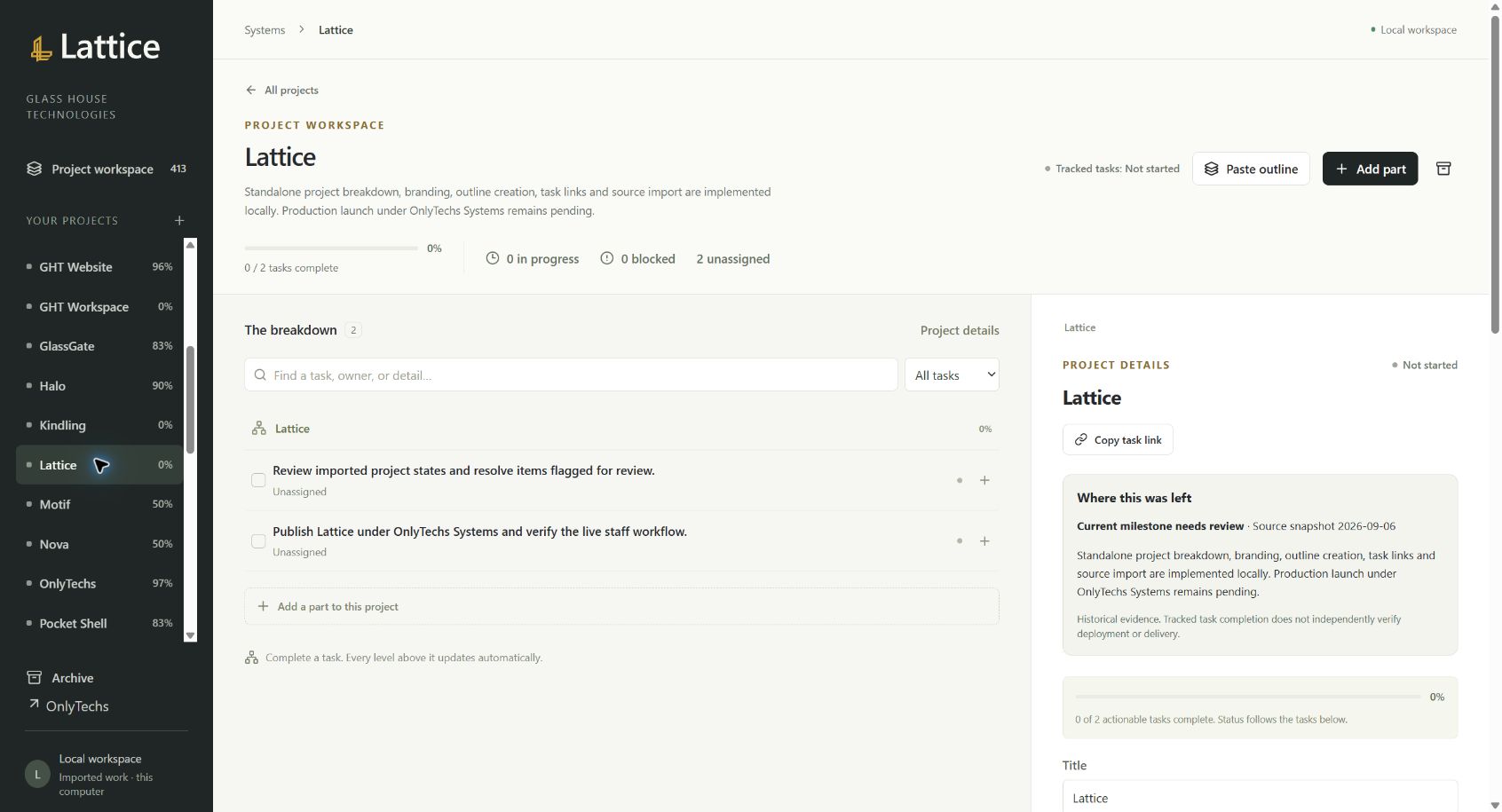
That is the idea behind Lattice. The screenshot here comes from the actual local development workspace. You can see a project broken into individual tasks, with its recorded progress and the project details beside it. The useful change is that the project starts to become something we can inspect rather than just a name in a list.
For a project with several moving parts, that structure gives us a better way to discuss the work. We can look at a particular task, connect it to the larger objective, and identify which part needs another decision or another round of implementation. The view should help us understand the relationship between the pieces as the project develops.
The screenshot also shows why I want to keep progress and readiness clear. A recorded task count is information about the work in the system. It is not proof that an application is ready for production. Lattice is currently a local development implementation, and its production integration with OnlyTechs is still pending.
I want to build toward a project structure that stays useful as the work changes. Breaking the project into parts is the beginning. The larger goal is to keep the overall picture connected to what is actually happening on those tasks, so we can spend more attention on the work and less on reconstructing its status.
This is especially relevant as we develop more of the GHT applications together. Communication, documents, and operational tools all create work that needs a clear place. Lattice is a look at how I want to organize that growing effort and make it easier for other people to see what we are building.
Actual local development workspace, captured September 6, 2026. Recorded tasks are not a production-readiness score. Production integration remains pending.